
Конфигурирование L2TP LNS + LAC 2
Постройте схему в соответствии с рисунком ниже:
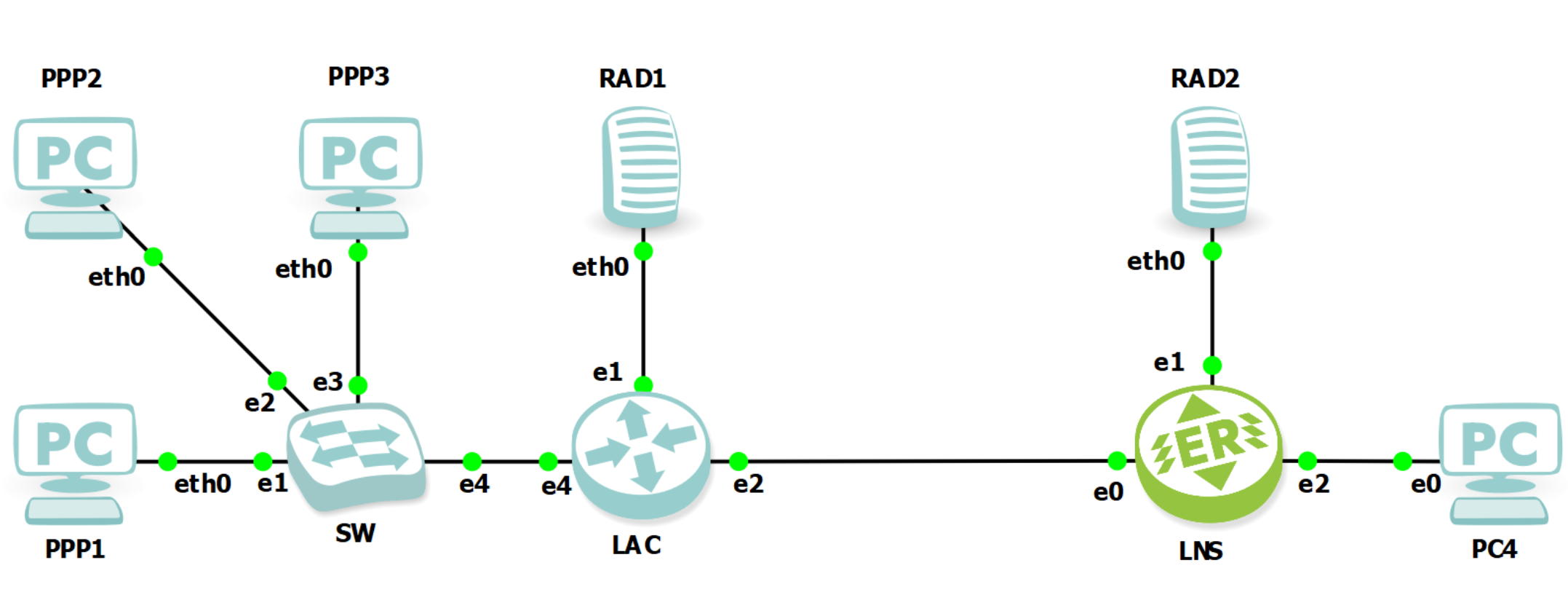
Рисунок
Настройте EcoRouter в качестве LNS
enable
configure

hostname LNS

ip vrf VRF_RADIUS
 rd 3.3.3.3:50
 route-target both 65030:50

ip vrf VRF_LNS
 rd 3.3.3.3:3001
 route-target both 65030:3001

# Настройка параметров группы RADIUS-серверов
radius-group pfsense-2
 # Пароль lns — идентичен настроенному на RADIUS
 radius-server 172.16.2.1 secret lns vrf VRF_RADIUS priority 10 source 172.16.2.3

# Создание абонентского AAA-профиля
subscriber-aaa AAA_RADIUS
 # Аутентификация и аккаунтинг будут проводиться
 # с помощью серверов указанных в RADIUS-группе pfsense-2
 authentication radius pfsense-2
 accounting radius pfsense-2

ip pool INET 1
 # Назначение диапазона IP-адресов для абонентов
 range 200.0.200.2-200.0.200.254
  activate

# Карта фильтрации разрешающая любой IPv4 трафик
filter-map policy ipv4 ANY 10
 match any any any
 set accept

# Настройка BGP между LNS и LAC
router bgp 65030
 bgp router-id 172.3.3.3
 no bgp default ipv4-unicast
 bgp log-neighbor-changes
 address-family ipv4 vrf VRF_LNS
  max-paths ebgp 5
  redistribute connected
  neighbor 172.21.0.2 remote-as 65010
  neighbor 172.21.0.2 update-source 172.21.0.1
  neighbor 172.21.0.2 activate
  neighbor 172.21.0.2 route-map RM_/32 in
  neighbor 172.21.0.2 route-map RM_/32 out
  exit-address-family

ip prefix-list PL_ANY seq 5 permit any
ip prefix-list PS_/32 seq 10 permit 0.0.0.0/0 ge 31

# Настройка политик для абонентов
subscriber-policy SP_256K 1
 bandwidth in kbps 256
 bandwidth out kbps 256
 set filter-map in ANY
 set filter-map out ANY

subscriber-policy SP_512K 2
 bandwidth in kbps 512
 bandwidth out kbps 512
 set filter-map in ANY
 set filter-map out ANY

subscriber-policy SP_1M 3
 bandwidth in mbps 1
 bandwidth out mbps 1
 set filter-map in ANY
 set filter-map out ANY

subscriber-policy SP_2M 4
 bandwidth in mbps 2
 bandwidth out mbps 2
 set filter-map in ANY
 set filter-map out ANY

# Настройка сервиса абонентов
subscriber-service SS_PPPoE
 set policy SP_256K

subscriber-service SS_PPPoE2
 set policy SP_512K

subscriber-service SS_PPPoE3
 set policy SP_2M

ppp-options PPP
 # Подключить AAA-профиль
 set aaa AAA_RADIUS
 # Подключить сервис абонентов
 set subscriber-service SS_PPPoE
 # Включить повторное согласование LCP
 lcp renegotiation
 # Выбрать возможные способы аутентификации
 authentication pap chap
 # Подключить пул адресов абонентов
 pool ipv4 INET 1
   # Задать шлюз по умолчанию и DNS-сервер
   gateway 200.0.200.1
   dns 8.8.8.8

l2tp-profile L2TP
 # Подключить профиль PPP
 set ppp-options PPP
 # Принимать любые адреса отправителя (source)
 set allowed-ip PL_ANY
 # Принимать любые адреса назначения (destination)
 ipv4 address any
 # Наименование маршрутизатора
 host-name LNS
 # Наименование производителя
 vendor-name RDP

port ge0
 description to_LAC
 mtu 1518
 service-instance dot1q.10
  encapsulation dot1q 10
  rewrite pop 1
 service-instance untag
  encapsulation untagged

port ge1
 description to_RADIUS
 mtu 1514
 service-instance untag
  encapsulation untagged

port ge2
 description to_PC4
 mtu 1514
 service-instance untag
  encapsulation untagged

# Интерфейс loopback маршрутизатора LNS
interface loopback.0
 description RID
 ip mtu 1500
 ip address 3.3.3.3/32

# Адрес по умолчанию маршрутизатора
interface loopback.201
 description DEFAULT_ROUTER
 ip mtu 1500
 ip vrf forwarding VRF_LNS
 ip address 200.0.200.1/32

# Интерфейс BMI для PPP-абонентов
interface bmi.3001
 ip mtu 1500
 # В каком VRF находится интерфейс BMI
 ip vrf forwarding VRF_LNS
 connect port ge0 service-instance untag
 # Получение адреса по DHCP является тригером для создания сессий абонентов
 session-trigger dhcp
 reject-timeout 5
 ip malicious-action accept
 ip address 172.3.3.3/31
 # Подключение профиля L2TP
 set l2tp-profile L2TP

interface ge1.0
 description to_RADIUS
 ip mtu 1500
 # Привязать интерфейс к VRF
 ip vrf forwarding VRF_RADIUS
 connect port ge1 service-instance untag
 ip address 172.16.2.3/24

interface ge0.10
 description to_LAC
 ip mtu 1500
 # Привязать интерфейс к VRF
 ip vrf forwarding VRF_LNS
 connect port ge0 service-instance dot1q.10
 ip address 172.21.0.1/24

route-map RM_/32 permit 10
 match ip address prefix-list PS_/32
Настройте LAC
Приведённая ниже конфигурация реализована на базе маршрутизатора Nokia 7750 SR с операционной системой TiMOS-B-20.10.R8.
#--------------------------------------------------
echo "System Configuration"
#--------------------------------------------------
system
name "LAC"
exit
#--------------------------------------------------
echo "AAA (Declarations) Configuration"
#--------------------------------------------------
aaa
radius-server-policy "AAA_radius" create
exit
exit
#--------------------------------------------------
echo "Card Configuration"
#--------------------------------------------------
card 1
card-type iom-1
mda 1
mda-type me16-25gb-sfp28+2-100gb-qsfp28
no shutdown
exit
no shutdown
exit
#--------------------------------------------------
echo "Connector Configuration"
#--------------------------------------------------
port 1/1/c1
connector
breakout c1-10g
exit
no shutdown
exit
port 1/1/c2
connector
breakout c1-10g
exit
no shutdown
exit
port 1/1/c3
connector
breakout c1-10g
exit
no shutdown
exit
port 1/1/c4
connector
breakout c1-10g
exit
no shutdown
exit
#--------------------------------------------------
echo "Port Configuration"
#--------------------------------------------------
port 1/1/c1/1
description "RADIUS"
ethernet
mode access
exit
no shutdown
exit
port 1/1/c2/1
description "to_LNS"
ethernet
mode access
encap-type dot1q
exit
no shutdown
exit
port 1/1/c3/1
ethernet
encap-type dot1q
mtu 1518
exit
no shutdown
exit
port 1/1/c4/1
ethernet
mode access
encap-type dot1q
exit
no shutdown
exit
port A/3
shutdown
ethernet
exit
exit
#--------------------------------------------------
echo "System Sync-If-Timing Configuration"
#--------------------------------------------------
system
sync-if-timing
begin
commit
exit
exit
#--------------------------------------------------
echo "QoS Policy Configuration"
#--------------------------------------------------
qos
sap-ingress 20 name "20" create
description "64K_upstream"
queue 1 create
rate 64
exit
queue 11 multipoint create
exit
exit
sap-ingress 30 name "30" create
description "128K_upstream"
queue 1 create
rate 128
exit
queue 11 multipoint create
exit
exit
sap-ingress 40 name "40" create
description "256K_upstream"
queue 1 create
rate 256
exit
queue 11 multipoint create
exit
exit
sap-ingress 50 name "50" create
description "512K_upstream"
queue 1 create
rate 512
exit
queue 11 multipoint create
exit
exit
sap-egress 20 name "20" create
description "256K_downstream"
queue 1 create
rate 256
exit
fc be create
queue 1
dot1p 5
dscp ef
exit
exit
sap-egress 30 name "30" create
description "512K_downstream"
queue 1 create
rate 512
exit
fc be create
queue 1
dot1p 4
dscp af21
exit
exit
sap-egress 40 name "40" create
description "1M_downstream"
queue 1 create
rate 1024
exit
fc be create
queue 1
dot1p 5
dscp ef
exit
exit
sap-egress 50 name "50" create
description "2M_downstream"
queue 1 create
rate 2048
exit
fc be create
queue 1
dot1p 3
dscp cs1
exit
exit
exit
#--------------------------------------------------
echo "Management Router Configuration"
#--------------------------------------------------
router management
exit
#--------------------------------------------------
echo "Router (Network Side) Configuration"
#--------------------------------------------------
router Base
interface "system"
address 1.1.1.1/32
description "RID"
no shutdown
exit
autonomous-system 65010
exit
#--------------------------------------------------
echo "Subscriber-mgmt Configuration"
#--------------------------------------------------
subscriber-mgmt
authentication-policy "AUTH_plcy" create
pppoe-access-method pap-chap
include-radius-attribute
acct-session-id
remote-id
nas-port-id
nas-identifier
mac-address
exit
radius-server-policy "AAA_radius"
exit
radius-accounting-policy "ACC_plcy" create
update-interval 10
include-radius-attribute
circuit-id
framed-ip-addr
nas-identifier
nas-port-id
remote-id
sla-profile
sub-profile
subscriber-id
user-name
no detailed-acct-attributes
std-acct-attributes
exit
session-id-format number
radius-server-policy "AAA_radius"
exit
sla-profile "sla-profile-1M" create
ingress
qos 40
exit
exit
egress
qos 40
exit
no qos-marking-from-sap
exit
exit
sla-profile "sla-profile-256K" create
ingress
qos 20
exit
exit
egress
qos 20
exit
no qos-marking-from-sap
exit
exit
sla-profile "sla-profile-2M" create
ingress
qos 50
exit
exit
egress
qos 50
exit
no qos-marking-from-sap
exit
exit
sla-profile "sla-profile-512K" create
ingress
qos 30
exit
exit
egress
qos 30
exit
no qos-marking-from-sap
exit
exit
sub-profile "sub-profile-default" create
radius-accounting
policy "ACC_plcy"
exit
sla-profile-map
use-direct-map-as-default
exit
exit
sub-ident-policy "sub-id-default" create
sub-profile-map
use-direct-map-as-default
exit
sla-profile-map
use-direct-map-as-default
exit
exit
msap-policy "msap-default" create
sub-sla-mgmt
def-sub-id use-auto-id
def-sub-profile "sub-profile-default"
sub-ident-policy "sub-id-default"
multi-sub-sap limit 10
exit
exit
local-user-db "PPPoE" create
exit
exit
#--------------------------------------------------
echo "Service Configuration"
#--------------------------------------------------
service
system
bgp-auto-rd-range 1.1.1.1 comm-val 301 to 399
exit
customer 1 name "1" create
description "Default customer"
exit
customer 50 name "C_RADIUS" create
description "C_RADIUS"
exit
customer 200 name "C_PPPoE" create
description "Customers for clients PPPoE"
exit
customer 3001 name "C_L2TP-1" create
description "L2TP custopers 1"
exit
vprn 50 name "VPRN_RADIUS" customer 50 create
interface "to_radius" create
exit
exit
vprn 201 name "VPRN_201_PPPoE" customer 200 create
interface "vprn_201_loopback" create
exit
subscriber-interface "vprn_201_sub_int" create
group-interface "vprn_201_group_int" create
exit
exit
exit
vprn 301 name "VPRN_301_PPPoE" customer 200 create
subscriber-interface "vprn_301_sub_int" create
group-interface "vprn_301_group_int" create
exit
exit
interface "vprn_301_loopback" create
exit
exit
vprn 3001 name "VPRN_L2TP_1" customer 3001 create
interface "to_LNS-1" create
exit
interface "vprn_3001-loopback" create
exit
interface "to_LNS-2" create
exit
exit
vprn 50 name "VPRN_RADIUS" customer 50 create
description "VPRN for RADIUS"
autonomous-system 65010
route-distinguisher 1.1.1.1:50
interface "to_radius" create
description "to_RADIUS"
address 172.16.1.2/24
sap 1/1/c1/1 create
exit
exit
radius-server
server "pfsense-1" address 172.16.1.1 secret "pA1Oc81qTdyZ9MakJRlmKeY/6w==" hash2 create
accept-coa
exit
exit
no shutdown
exit
vpls 200 name "VPLS_PPPoE" customer 200 create
description "VPLS for PPPoE clients"
stp
shutdown
exit
sap 1/1/c4/1:* capture-sap create
trigger-packet pppoe
msap-defaults
policy "msap-default"
exit
authentication-policy "AUTH_plcy"
no shutdown
exit
no shutdown
exit
vprn 201 name "VPRN_201_PPPoE" customer 200 create
description "VPRN PPPoE clients"
route-distinguisher auto-rd
interface "vprn_201_loopback" create
description "VPRN loopback interface"
address 192.168.3.2/32
loopback
exit
subscriber-interface "vprn_201_sub_int" create
unnumbered "vprn_201_loopback"
group-interface "vprn_201_group_int" create
description "VPRN group interface"
authentication-policy "AUTH_plcy"
oper-up-while-empty
pppoe
session-limit 100
no shutdown
exit
exit
exit
no shutdown
exit
vprn 301 name "VPRN_301_PPPoE" customer 200 create
description "VPRN PPPoE clients"
route-distinguisher auto-rd
interface "vprn_301_loopback" create
description "VPRN loopback interface"
address 192.168.3.1/32
loopback
exit
subscriber-interface "vprn_301_sub_int" create
unnumbered "vprn_301_loopback"
group-interface "vprn_301_group_int" create
description "VPRN group interface"
authentication-policy "AUTH_plcy"
oper-up-while-empty
pppoe
session-limit 100
no shutdown
exit
exit
exit
no shutdown
exit
vprn 3001 name "VPRN_L2TP_1" customer 3001 create
description "VPRN L2TP for connections 1"
autonomous-system 65010
route-distinguisher 1.1.1.1:3001
interface "to_LNS-1" create
address 172.21.0.2/24
sap 1/1/c2/1:10 create
exit
exit
interface "vprn_3001-loopback" create
address 172.1.1.1/32
loopback
exit
interface "to_LNS-2" create
address 172.31.0.2/28
sap 1/1/c2/1:20 create
exit
exit
bgp
router-id 172.1.1.1
group "LNS-1"
family ipv4
import "import_/32"
export "export_/32"
peer-as 65020
local-address "to_LNS-1"
neighbor 172.21.0.1
type external
peer-as 65030
exit
exit
no shutdown
exit
l2tp
no shutdown
exit
no shutdown
exit
exit
#--------------------------------------------------
echo "Router (Service Side) Configuration"
#--------------------------------------------------
router Base
#--------------------------------------------------
echo "Policy Configuration"
#--------------------------------------------------
policy-options
begin
prefix-list "/32s"
prefix 0.0.0.0/0 prefix-length-range 31-32
exit
policy-statement "export_/32"
entry 10
from
protocol direct
prefix-list "/32s"
exit
action accept
exit
exit
default-action drop
exit
exit
policy-statement "import_/32"
entry 10
from
protocol bgp
prefix-list "/32s"
exit
action accept
exit
exit
default-action drop
exit
exit
commit
exit
exit
#--------------------------------------------------
echo "Subscriber-mgmt (Service Side) Configuration"
#--------------------------------------------------
subscriber-mgmt
local-user-db "PPPoE" create
description "DB for PPPoE clients"
ppp
match-list username
host "default" create
auth-policy "AUTH_plcy"
no shutdown
exit
exit
no shutdown
exit
exit
#--------------------------------------------------
echo "Log all events for service vprn Configuration"
#--------------------------------------------------
log
exit
#--------------------------------------------------
echo "AAA Configuration"
#--------------------------------------------------
aaa
radius-server-policy "AAA_radius" create
acct-on-off oper-state-change
servers
router 50
buffering
acct-interim min 60 max 3600 lifetime 5
acct-stop min 60 max 3600 lifetime 5
exit
server 1 name "pfsense-1"
exit
exit
exitНастройте PPP1, PPP2 и PPP3
Все абонентские PPP устройства настраиваются аналогично друг другу: /etc/ppp/peers/provider
defaultroute
plugin rp-pppoe.so
eth0
user admin@ecorouter.lab
usepeerdns
/etc/ppp/chap-secrets
# Secrets for authentication using CHAP
# client        server  secret                  IP addresses
"admin@ecorouter.lab" * "pass1234"- PPP1 должен получить имя admin@ecorouter.lab и пароль pass1234.
- PPP2 должен получить имя admin2@ecorouter.lab и пароль pass12345.
- PPP3 должен получить имя admin3@ecorouter.lab и пароль pass123456.
Настройте RAD1:
На интерфейсе eth0 настройте IP-адрес 172.16.1.1 и маску 255.255.255.0.
/etc/raddb/clients.conf
client LAC {
ipaddr = 172.16.1.2
secret = lac
}
Словарь /etc/raddb/dictionary должен быть заполнен атрибутами соответствующими производителю LAC.
В файле /etc/raddb/users задайте настройки для трёх абонентов:
admin@ecorouter.lab Cleartext-Password := "pass1234", NAS-Identifier==LAC, Auth-Type=Accept

        Alc-Tunnel-Serv-Id=3001,
        Tunnel-Assignment-Id="ISP-retail-2",
        Tunnel-Type=L2TP,
        Tunnel-Medium-Type=IP,
        Tunnel-Server-Endpoint=172.3.3.3,
        Tunnel-Client-Endpoint=172.1.1.1,
        Tunnel-Assignment-Id+="ISP2",
        Alc-MSAP-Policy="msap-default",
        Alc-MSAP-Interface="vprn_201_group_int",
        Alc-MSAP-Serv-Id=201,
        Alc-SLA-Prof-Str="sla-profile-2M"

admin2@ecorouter.lab Cleartext-Password := "pass12345", NAS-Identifier==LAC, Auth-Type=Accept

        Alc-Tunnel-Serv-Id=3001,
        Tunnel-Assignment-Id="ISP-retail-2",
        Tunnel-Type=L2TP,
        Tunnel-Medium-Type=IP,
        Tunnel-Server-Endpoint=172.3.3.3,
        Tunnel-Client-Endpoint=172.1.1.1,
        Tunnel-Assignment-Id+="ISP2",
        Alc-MSAP-Policy="msap-default",
        Alc-MSAP-Interface="vprn_201_group_int",
        Alc-MSAP-Serv-Id=201,
        Alc-SLA-Prof-Str="sla-profile-2M"

admin3@ecorouter.lab Cleartext-Password := "pass123456", NAS-Identifier==LAC, Auth-Type=Accept

        Alc-Tunnel-Serv-Id=3001,
        Tunnel-Assignment-Id="ISP-retail-2",
        Tunnel-Type=L2TP,
        Tunnel-Medium-Type=IP,
        Tunnel-Server-Endpoint=172.3.3.3,
        Tunnel-Client-Endpoint=172.1.1.1,
        Tunnel-Assignment-Id+="ISP2",
        Alc-MSAP-Policy="msap-default",
        Alc-MSAP-Interface="vprn_201_group_int",
        Alc-MSAP-Serv-Id=201,
        Alc-SLA-Prof-Str="sla-profile-2M"
Настройте RAD2
На интерфейсе eth0 настройте IP-адрес 172.16.2.1 и маску 255.255.255.0.
/etc/raddb/clients.conf
client LNS {
ipaddr = 172.16.2.3
secret = lns
}
Словарь /etc/raddb/dictionary должен быть заполнен специфичными для производителя РДП Инновации атрибутами:
VENDOR       RDP        45555

BEGIN-VENDOR RDP
ATTRIBUTE     SUBSCRIBER_POLICY_OPTIONS                 242 string
ATTRIBUTE     SUBSCRIBER_ID                             243 string
ATTRIBUTE     SUBSCRIBER_HW_ADDRESS                     244 string
ATTRIBUTE     SUBSCRIBER_POLICY_BANDWIDTH               245 string
ATTRIBUTE     TIME_QUOTA                                246 integer
ATTRIBUTE     FILTER_MAP_POLICY                         247 string
ATTRIBUTE     POLICY_NAME                               248 string
ATTRIBUTE     SUBSCRIBER_OPTION                         249 integer
ATTRIBUTE     SUBSCRIBER_SERVICE_NAME                   250 string
ATTRIBUTE     SHARED_SERVICES                           251 string
ATTRIBUTE     BANDWIDTH_IN                              252 integer
ATTRIBUTE     BANDWIDTH_OUT                             253 integer
ATTRIBUTE     REDIRECT_URL                              254 string
ATTRIBUTE     VRF_NAME                                  255 string
ATTRIBUTE     ACCT_IN_POLICY_OCTETS_64                  150 octets
ATTRIBUTE     ACCT_OUT_POLICY_OCTETS_64                 151 octets
ATTRIBUTE     ACCT_IN_POLICY_PACKETS_64                 152 octets
ATTRIBUTE     ACCT_OUT_POLICY_PACKETS_64                153 octets
ATTRIBUTE     PRIMARY_DNS                               93  string
ATTRIBUTE     SECONDARY_DNS                             94  string
ATTRIBUTE     VENDOR_CLASS                              95  string
ATTRIBUTE     REMOTE_ID                                 96  string
ATTRIBUTE     CIRCUIT_ID                                97  string
END-VENDOR    RDP
В файле /etc/raddb/users задайте настройки для трёх абонентов:
admin@ecorouter.lab   Cleartext-Password := "pass1234", NAS-Identifier==LNS
                      SUBSCRIBER_SERVICE_NAME+="SS_PPPoE",
                      Session-Timeout=1200

admin2@ecorouter.lab  Cleartext-Password := "pass12345", NAS-Identifier==LNS
                      SUBSCRIBER_SERVICE_NAME+="SS_PPPoE2",
                      Session-Timeout=1200

admin3@ecorouter.lab  Cleartext-Password := "pass123456", NAS-Identifier==LNS
                      SUBSCRIBER_SERVICE_NAME+="SS_PPPoE3",
                      Session-Timeout=1200
Проверьте работу построенной схемы
На LNS проверьте BGP-соседство с LAC командой show ip bgp summary vrf VRF_LNS.
Для проверки соединения, с абонентских устройств (PPP1, PPP2, PPP3) дайте команду ping 173.0.2.2 (PC4).
На LNS проверьте список присоединённых абонентов командой show subscribers bmi.3001. В выводе таблицы должны присутствовать абоненты admin@ecorouter.lab, admin2@ecorouter.lab, admin3@ecorouter.lab.
На LNS командой show subscribers bmi.3001 <A.B.C.D> проверьте, какой сервис (Subscriber-service) применён для каждого абонента. Должны быть применены сервисы SS_PPPoE, SS_PPPoE2 и SS_PPPoE3 соответственно.